


Fine Lock (only for Samsung)
4.41.06K Reviews
App Specs
- Version
- Varies with Device
- Updated On
- License
- Free
- Downloads
- 10,000,000+
- Developer
- YUH APPS
- Categories
- Personalization
- Platform
- Android
Screenshots
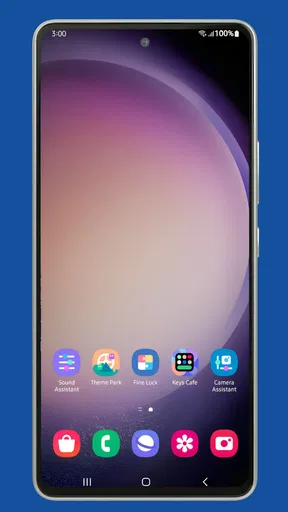
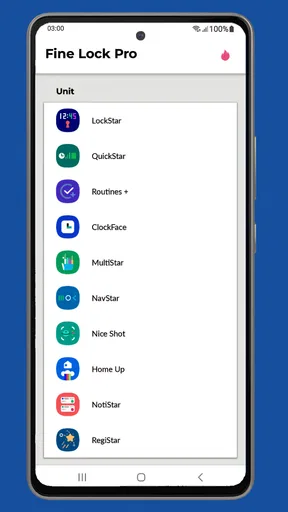
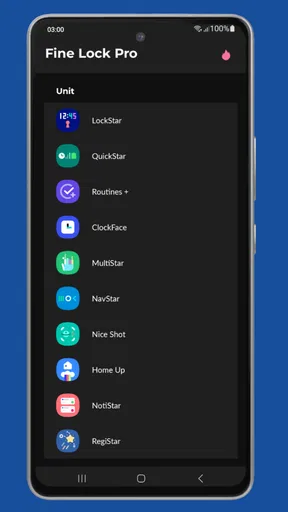
 Analysis by AppCompare
When I first tried to personalize a Samsung phone beyond the usual wallpaper and icon changes, the confusing part wasn’t choosing what to change; it was figuring out how to reach the right tools. Fine Lock gives those tools a simple place to start. It is a personalization app from YUH APPS, designed for Samsung owners who want a launcher for Good Lock and Good Guardians modules. It does not replace those modules, but it can make finding and opening them less of a chore.
What to expect from this Samsung-focused launcher
I’d think of Fine Lock as an organizer and entry point, not as a customization suite that changes your phone by itself. The distinction matters: installing the launcher alone doesn’t transform the lock screen or app switcher. You use it to reach compatible modules, and those modules are where the actual changes happen. If you’re expecting a single app with all the controls built in, that extra step may feel unexpected at first.
That focused role is also why it can be useful. Samsung’s customization options can feel scattered when you’re new to them, especially if you have heard about Good Lock but don’t know which part to open. Fine Lock gives you a more direct starting point. Its appeal is less about adding another layer of effects and more about making Samsung’s own modular approach easier to navigate.
Getting from install to a useful first step
After installing Fine Lock, I’d begin by opening it and checking which modules are available to launch on the device. Then I’d choose one specific goal rather than trying to customize everything at once: perhaps changing the recent-apps view or adjusting the lock screen. That makes it easier to see the division of labor. Fine Lock is the doorway; the module is the room where you make the change.
Before searching for a module, it helps to check whether it is compatible with your Samsung device and software setup. Module availability can vary, and Fine Lock does not remove every regional restriction. If something you expected to see is missing, that does not necessarily mean the launcher is broken. It may simply mean the module needs to be obtained separately or is not available for your setup.
A first success that feels practical
A good first experiment is a small, reversible change rather than a full interface makeover. If a suitable module is installed, open it through Fine Lock, make one adjustment, and then use your phone normally for a while. For example, a change to the recent-apps layout can be judged during the next few app switches; a lock-screen adjustment is easy to assess the next time you check the time or notifications.
This approach is more useful than changing several settings in one sitting. When something feels unfamiliar, you’ll know which adjustment caused it and can go back to the module to revise it. I also recommend taking note of the original setting before experimenting. It gives you a simple reference point if the new arrangement looks good in a preview but feels awkward in everyday use.
Worth Reading Before You Choose

EA SPORTS FC Mobile 26 Is a Bigger Football Game, but It Takes Time

Flipboard Shows What News Apps Must Do Beyond the Feed

Switching to Android Auto Means Rethinking Your Driving Routine

Google Calendar Makes a Crowded Week Easier to Manage

Ludo King Makes the Most of the Minutes Between Plans

Baby Panda World Brings Quick Play to Modern Phones, but Its Game Library Feels Busy
Where the setup can become confusing
The main friction is that Fine Lock is not the module store and does not install the modules for you. You may need to find and install a module separately before it appears as something you can use. That extra step is manageable for people who are comfortable following installation instructions, but it is less reassuring for anyone who expects a one-tap, all-in-one setup.
I’d be cautious about downloading module files from unfamiliar sources just to get around availability issues. A customization tweak is rarely worth taking a security risk for. Stick to sources you trust, check that a download is intended for your device, and avoid installing a file if you are unsure what it is. If that process sounds like more effort than you want, Samsung’s built-in personalization settings are the simpler route.
Who will get the most from it
Fine Lock makes the most sense for Samsung users who already want to explore Good Lock or Good Guardians modules and would appreciate a convenient launcher for them. It is also a reasonable fit for someone who likes to make occasional, deliberate adjustments without replacing the phone’s familiar interface. If all you want is a new wallpaper, a different launcher, or a basic icon pack, this is probably more infrastructure than you need.
The app is free, with in-app purchases listed at $1.99 per item, and it is rated for Everyone. Its average rating is 4.5 from around 58,000 ratings, with about 1,000 written reviews and over 10 million installs. It was released on June 11, 2019. Those figures suggest that many people have found a use for it, but I’d still judge it by whether you want this particular Samsung-module workflow rather than by popularity alone.
How it differs from simpler personalization options
Compared with a conventional Android launcher, Fine Lock has a narrower purpose. A replacement launcher typically changes the home screen experience directly; Fine Lock is aimed at accessing Samsung modules, which can affect other parts of the interface depending on what you install. If your goal is a different home-screen grid or a new visual theme, a standard launcher or Samsung’s own settings may be quicker. If you want to explore module-based tweaks, Fine Lock is more relevant.
That narrower focus is a trade-off, not a flaw in itself. You are not adding a complete alternative interface, and you should not expect every Samsung feature to be controlled from one place. The benefit is that your existing phone experience remains the foundation. You can try one module, keep the changes that help, and leave the rest untouched.
Unlocking the Magic of Fine Lock
So, what's the deal with Fine Lock? Imagine having a toolkit that lets you access all the Good Lock modules Samsung has to offer—without any of the usual regional restrictions. It’s like having a backstage pass to the coolest customization features for your phone.
First off, the app is super lightweight and doesn’t gobble up your phone’s resources, which is a huge plus. It basically acts as a launcher for those Good Lock modules, which means you can tailor almost every aspect of your Samsung experience directly from your home screen. Just a tap, and you're in!
A User-Friendly Interface
One thing I really appreciate about Fine Lock is its user-friendly interface. Even if you're not tech-savvy, navigating through the app is a breeze. The developers have done a fantastic job of keeping things simple and intuitive. All the modules are neatly organized, and you can easily see which ones are installed and ready to use. It’s all about making life easier, right?
Customizing Made Easy
What can you actually do with Fine Lock? Well, the possibilities are almost endless. Want to change your lock screen’s appearance or tweak the multitasking layout? There’s a module for that. From UI customizations to system tweaks, Fine Lock lets you dabble in a bit of everything.
For example, I love using the Task Changer module to switch up the look and feel of my recent apps screen. It’s like giving your phone a mini makeover without any hassle. And for those who love to have everything organized, the LockStar module allows you to customize your lock screen to your heart's content.
Keeping It Updated
Fine Lock is also great when it comes to keeping you in the loop. The app regularly checks for updates to the Good Lock modules, ensuring you always have access to the latest features and fixes. It’s like having a personal assistant that keeps your phone in tip-top shape.
And let’s not forget about the helpful notifications. Fine Lock will let you know when new modules become available or when updates are ready to install. It’s all about staying informed and keeping your device running smoothly.
The Catch: Regional Limitations
Now, while Fine Lock is a fantastic tool, it’s important to note that it doesn’t actually install the Good Lock modules for you. You’ll need to download them separately, which can be a bit of a hurdle if they’re not available in your region. But once you’ve got them, Fine Lock makes managing them a breeze.
However, there’s an active community of users who share APKs, so with a little searching, you can usually find what you need. Just make sure to download from trusted sources to keep your device safe.
Final Thoughts
Overall, Fine Lock is a gem for anyone looking to unleash the full potential of their Samsung device. It’s easy to use, packed with features, and keeps you updated with the latest and greatest in customization. Whether you’re a customization enthusiast or just someone who wants a bit more control over their device, Fine Lock is definitely worth a try.
So, if you’re ready to take your Samsung experience to the next level, give Fine Lock a shot. It might just be the app you didn’t know you needed!
Pros
- Seamless integration with Samsung devices.
- User-friendly interface with intuitive design.
- Customizable features for personalization.
- Regular updates ensure stability and new features.
- Optimized for battery efficiency.
Cons
- Only compatible with Samsung devices.
- Requires manual setup for some features.
- Ads can be intrusive at times.
- Limited support for older Samsung models.
- No offline functionality available.
FAQs for Fine Lock (only for Samsung)
What is Fine Lock and how does it enhance my Samsung device?
Fine Lock is an app designed for Samsung devices that acts as a launcher for Good Lock modules. It helps users access and manage these modules easily, enhancing customization and functionality on your device. With Fine Lock, you can personalize your Samsung phone with diverse modules tailored to improve user experience and productivity.
Is Fine Lock compatible with all Samsung devices?
Fine Lock is specifically designed for Samsung devices running Android Nougat (7.0) or later. However, its functionality may vary depending on the specific model and the availability of Good Lock modules in your region. Ensure your device supports Good Lock before downloading Fine Lock for the best experience.
Does using Fine Lock require rooting my Samsung device?
No, Fine Lock does not require rooting your Samsung device. It operates without needing any system modifications. Users can easily download and manage Good Lock modules directly through Fine Lock, maintaining the integrity and warranty of their device while enjoying enhanced customization options.
Are there any ads in the Fine Lock app?
Fine Lock is designed to offer a seamless experience without intrusive ads. The app prioritizes user experience by providing clean navigation and easy access to Good Lock modules without the distraction of advertisements, ensuring a smooth and efficient interface for users.
How do I download and install Good Lock modules using Fine Lock?
To download and install Good Lock modules through Fine Lock, first, open the Fine Lock app on your Samsung device. The app will display available modules that can be accessed based on your region. Simply click on a module to be directed to the Galaxy Store to download and install it. After installation, you can manage these modules directly from Fine Lock.


